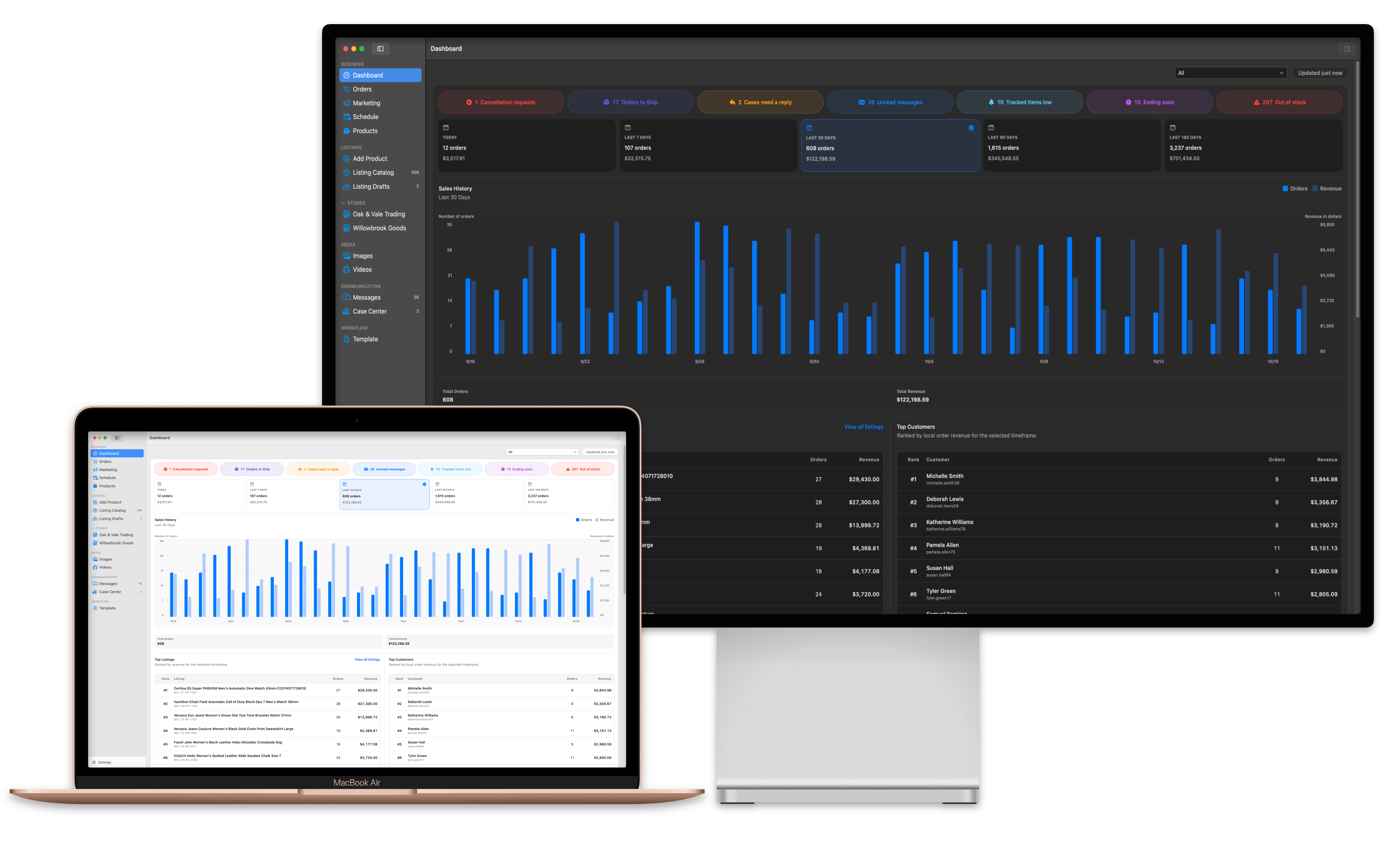
SellerHint dashboards in dark and light appearance on a desktop display and MacBook Air.

What SellerHint is

SellerHint is operational software for eBay sellers. It is built for the work that sits behind your listings: keeping product information organised, preparing changes carefully, reviewing orders and messages, keeping quantity aligned across stores, and knowing which store a given marketplace record belongs to.

It is for sellers who manage more than the occasional individual listing. It is not a marketplace, a payment processor, a shipping carrier, or an official eBay product, and it is not affiliated with eBay Inc.

Where the hint comes in

Selling at any scale is a long list of small judgements. SellerHint is built for the moment one of them becomes clear.

A normal day looks like this

  • Managing hundreds or thousands of products
  • Working out which listing needs attention first
  • Tracking inventory across more than one store
  • Checking what came in overnight
  • Updating many listings without breaking any of them
  • Reviewing how a campaign is actually performing
  • Answering a buyer without losing your place
  • Keeping two stores from bleeding into each other
  • Catching an inventory mistake before it costs you a sale
  • Noticing the thing that needed action yesterday

The hint is the organisation, context and information that makes the next action obvious. Not a tip, and not advice: the product does not tell you what to do with your business. It arranges the work so that what needs doing is visible, and leaves the judgement to you.

Most of that list is not hard because the individual task is hard. It is hard because the information needed to act sits in five places, and because one wrong move reaches a listing that is still selling.

Organised work makes the next action obvious.

Clarity

You can tell what you are looking at, without inferring it.

Order, payment, fulfilment, shipment and delivery are separate values rather than one status. A product record is never confused with the listing it is linked to.

Guidance

What needs attention finds you, instead of waiting to be discovered.

Low-stock thresholds, product warnings, listings ending soon, GTC Guard relist monitoring, and import conflicts raised for you to resolve.

Control

Nothing reaches the marketplace that you did not deliberately send.

Saving locally and sending changes to eBay are separate actions. Inventory Sync previews every quantity change first. Products linked to live listings are protected from deletion.

Organisation

One place for the work behind a listing, including the parts buyers never see.

Catalog, drafts, templates, images and per-store values in one record, alongside cost, notes and storage location that stay private to you.

Efficiency

Less switching, less repetition, fewer tabs.

Search, filters, customisable columns, CSV import, and orders, marketing, schedules and messages in the same workspace as the catalog.

Intelligence

The tedious analysis is done for you; the decision stays yours. This is careful engineering, not artificial intelligence.

Normalised SKU and title matching during import, exact marketplace identity for every remote action, and cross-store quantity comparison — each surfacing what it found rather than acting on it.

Two separate products

SellerHint for Mac and SellerHint Web are separate products with separate accounts, billing, backends and data. Buying one does not include the other.

SellerHint for Mac

A native macOS application for managing eBay seller operations, with product records, images and preferences stored primarily on your Mac.

  • Native macOS application, Mac only
  • Free forever for one marketplace account and 100 listings
  • Pro raises that to five accounts, with no listing cap set by SellerHint
  • Local-first product and image management
  • Marketplace actions handled through SellerHint services

SellerHint Web

A separate browser-based SellerHint product with its own account, backend, storage and pricing, for sellers who need access outside the native Mac application.

  • The same feature set, reached from any browser
  • Your data stored in your Web account, not on one machine
  • Subscription, billed separately from the Mac app
  • No data is shared with SellerHint for Mac

Free forever on the starter tier. SellerHint Web accounts are separate from SellerHint for Mac.

The problems it addresses

These are the day-to-day operational problems SellerHint is built around.

  • Stock running out before anyone notices it is getting low
  • Listings that have sat for a year without selling, and nothing surfacing them
  • Product information spread across spreadsheets, folders and the marketplace interface
  • The same listing update repeated by hand, store after store
  • No clear line between the product record you keep and the listing that is live
  • Several stores to run, with no safe way to keep their data apart
  • Quantities that drift out of step between stores
  • Switching between listing, order, marketing, message and schedule tools all day
  • Changes reaching a live listing before you meant them to
  • No obvious answer to which store a particular marketplace record belongs to
  • Images, listing details and seller-only notes that are hard to keep organised

What you can manage

Availability differs between the two products. The features directory labels every capability for each one.

Dashboard

Business health at a glance — and, unusually, the weak points as prominently as the wins: what is out of stock, what has gone stale, and which tracked SKUs are running down.

  • Performance over a timeframe you choose
  • Out of Stock Listings
  • Stalest Listings
  • Top Listings
  • Track Inventory alerts

Products and Listings

The product catalog, drafts, templates, images and the store-specific values behind each listing.

  • Listing Catalog
  • Customisable columns and layouts
  • Duplicate SKU support
  • Protected deletion for live products
  • Product Details
  • Store tabs and store-specific overrides

Orders

Order review, order documents and the actions that are supported on eBay.

  • Orders workspace
  • Separated order, fulfilment, shipment and delivery status
  • Invoices, packing slips and printing
  • Open an order on eBay

Inventory

Quantity tracking, low-stock information and quantity-only synchronisation.

  • Inventory tracking and low-stock thresholds
  • Inventory Sync
  • Inventory master store

Marketing

Campaigns, promoted listings and Offers to Buyers, scoped to one store at a time.

  • Campaign browsing
  • Promoted listings and campaign membership
  • Offers to Buyers
  • Campaign creation
  • Marketing performance reporting

Schedule and Automation

Scheduled listings, listings ending soon, relist monitoring and background refresh.

  • Scheduled listings
  • Live listings ending soon
  • GTC Guard
  • Background refresh and alerts

Messages

Store-scoped buyer messages, conversations and replies.

  • Store-scoped messages

Cases

Review return requests and Item Not Received cases, message buyers, accept returns and issue refunds — without going back to the marketplace to find the case.

  • Case Center

See the full feature directory, with Mac and Web availability

How the work flows

A typical sequence in SellerHint for Mac. Not every step is available in both products.

  1. Connect an authorised eBay store.
  2. Import your existing listings, or create product records from scratch.
  3. Organise local product details, images and seller-only information.
  4. Review the store-specific values for each connected store.
  5. Save your work locally, as often as you like.
  6. Send supported changes to the correct marketplace listing when you are ready.
  7. Monitor orders, inventory, marketing, schedules, messages and warnings.

Local-first, stated precisely

What local-first means, and what it does not mean.

Work that stays on your Mac

  • Product records and your edits to them
  • Managed images and per-store image order
  • Preferences, drafts and listing templates
  • Seller-only information such as cost, notes and storage location
  • Cached marketplace information used to display workspaces quickly

Work that needs a connection

  • Authorising an eBay store
  • Refreshing listings, orders, messages, campaigns and cases
  • Sending supported changes to eBay
  • Any function that depends on SellerHint services

Which product is right for you?

A short preview. The full comparison covers data location, workflows, billing and support.
 SellerHint for MacSellerHint Web
Feature setAll workspacesThe same
Access methodNative macOS applicationBrowser, once available
Where your data livesPrimarily on your MacRemotely, in a separate backend
Current statusSee the product pageSee the product page
Shared with the other productNothingNothing

See the full comparison

Latest product information

Recent releases

No public releases have been published yet.

Current direction

Service status

No components are being reported publicly yet.

Common questions

What is SellerHint?

SellerHint is operational software for eBay sellers. It helps you manage the work behind your products and listings: product records, listing drafts and templates, images, orders, inventory quantity, marketing, scheduled work, buyer messages and connected stores.

It is not a marketplace, a payment processor, a shipping carrier, or an official eBay product.

Read the documentation

Is SellerHint affiliated with eBay?

No. SellerHint is an independent product. It is not affiliated with, endorsed by, sponsored by, certified by, or operated by eBay Inc. eBay is a trademark of eBay Inc.

Which marketplaces does SellerHint support?

eBay only. SellerHint is currently centred on eBay seller operations and is not a multichannel platform.

The list of supported eBay marketplaces has not been published yet. Do not assume every eBay marketplace is supported.

Read the documentation

What is the difference between SellerHint for Mac and SellerHint Web?

Not the features — both carry the same set of workspaces. The difference is where your data lives and how you reach it. SellerHint for Mac is a native macOS application that stores product records, images, preferences and drafts primarily on your Mac. SellerHint Web is a separate browser-based product that stores everything in your Web account, reachable from any machine.

They are separate products with separate accounts, separate billing and separate data. Buying one does not include the other.

Read the documentation

Does SellerHint for Mac automatically synchronise with SellerHint Web?

No. There is no synchronisation between the two products in either direction. They do not share accounts, subscriptions, databases, stored images, settings, drafts or marketplace data.

Read the documentation

Can SellerHint manage multiple stores without mixing their data?

Yes. Store isolation is fundamental. Listing values, images and image order, business policies, warnings, orders, messages, campaigns, synchronisation status, marketplace identifiers and store-specific overrides all stay attached to the store they belong to.

The one deliberate cross-store workflow is Inventory Sync, which you configure and preview, and which is limited to quantity.

Read the documentation

What does local-first mean?

It means product records, images, preferences, drafts and cached marketplace information are stored primarily on your Mac rather than on a server.

It does not mean SellerHint is offline or cloud-free. eBay authentication, marketplace reads and marketplace writes need an internet connection, and some functions depend on SellerHint services being available.

Read the documentation

Does SellerHint store my eBay password?

No. You sign in on eBay, not in SellerHint. The native Mac application does not contain marketplace application secrets and does not expose raw refresh tokens; authorisation and token handling occur at the SellerHint backend boundary.

SellerHint will never ask you for an eBay password, an OAuth token, an API key or a secret key.

Read the documentation

What is the difference between saving locally and sending changes to eBay?

Saving writes your work to SellerHint storage on your Mac and changes nothing on eBay. Sending supported changes is a separate, deliberate action that requires a connection and an authorised store.

Remote updates are processed in order, and results are reported back to you, including partial failures.

Read the documentation

What does quantity-only Inventory Sync mean?

Inventory Sync compares quantity across stores and applies quantity changes you approve. It is designed to preserve unrelated listing information rather than pushing a full listing update.

Read the documentation

Can I handle a return inside SellerHint?

To a large extent, yes. From Case Center you can message the buyer, accept an eligible return, issue a full refund or offer a partial one — whenever eBay currently permits that action for the case. SellerHint checks first, so you are not offered a button that will fail.

Escalation, declining a return and closing a case are not supported and continue on eBay. Financial and irreversible actions require a confirmation step before they are submitted.

Read the documentation

Are SellerHint for Mac and SellerHint Web priced separately?

Yes. They are separate products with separate billing, and they are sold differently: SellerHint for Mac is free to download with an optional upgrade at $4.99 per month, and SellerHint Web is a subscription at $9.99 per month.

Paying for one does not include the other, and no combined plan has been announced.

Is SellerHint for Mac free?

SellerHint for Mac is free to download and use, forever. The free tier covers one marketplace account and up to 100 listings.

Pro raises that to five marketplace accounts, with no listing limit set by SellerHint, at $4.99 per month. Those are United States App Store prices; Apple sets the equivalent in other storefronts.

Does SellerHint pricing include eBay fees?

No. SellerHint pricing covers SellerHint only. eBay seller fees, advertising fees, shipping costs and any taxes you owe on your sales are charged by those parties.

Read all frequently asked questions

Already using SellerHint?

Choose a product

No testimonials, ratings or customer logos appear on this website

Nothing of that kind is published because none has been collected and verified. When real, attributable feedback exists, it will appear with the name of the person who gave it.